Campaign Classification Guide
Introduction: read me!
With Campaign Classification we mean a set of rules and labels that allow us to conveniently tag campaigns, and enable better insights by providing a way to pull out only relevant data to answer specific business questions and to being able to take targeted data-driven actions.
Our solution requires each campaign to be qualified by three fields, which the internal campaign owner must properly set and promptly follow up in case of changes: Campaign Class, Campaign Family and Campaign Status Details. At the time when this page was written, this was possible by accessing the Campaign View Page of the tryber.me back-office and acting on three dedicated single-choice drop-down menus. Values displayed in menus can be updated according to changes in needs.
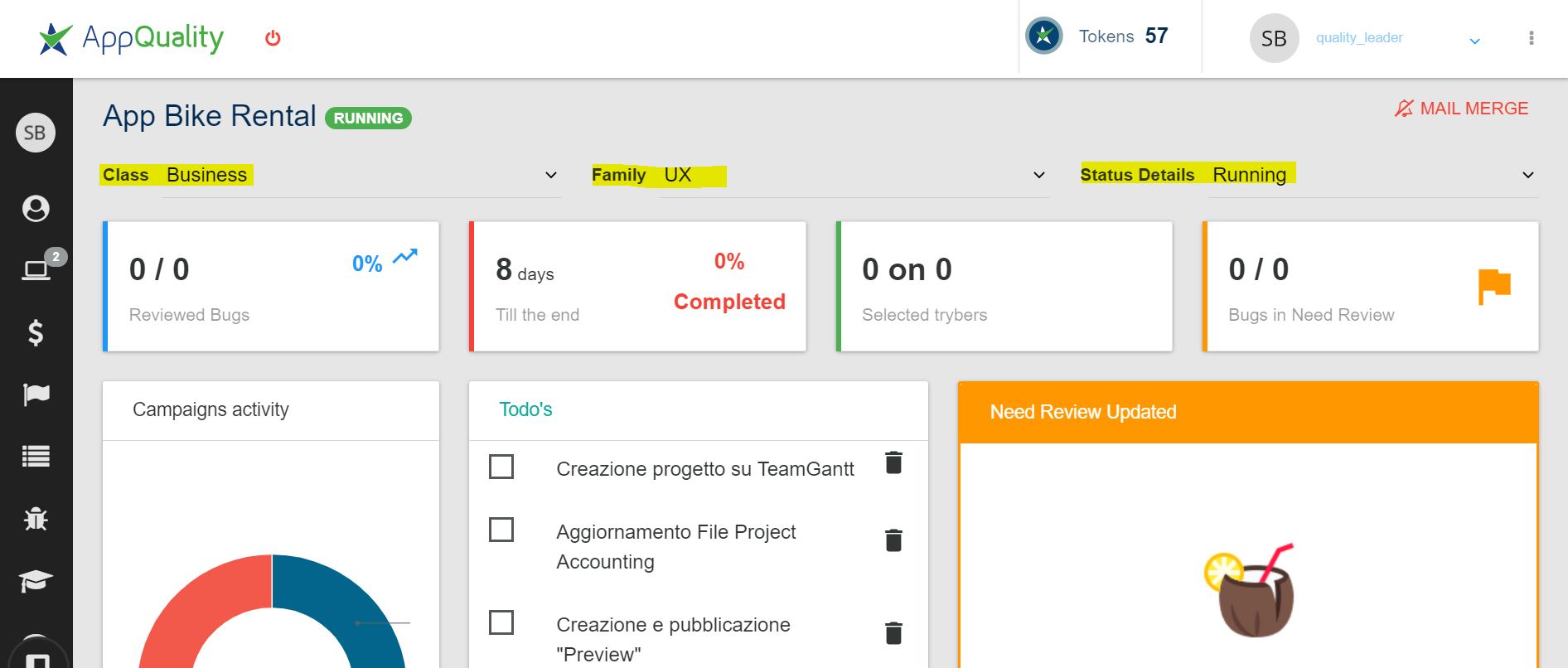
This guide is dedicated both to people who create the data (creating and managing campaigns) and to those who need to access and analyze data (e.g. Holistics users): synergy, understanding and proactivity in communicating changes in needs and in the operational scenario is of paramount importance for the efficacy of this approach, that might be even misleading otherwise; periodically checking this guide for changes and talking with colleagues are both good practices.
Please notice that, as a system of tags, the actions here described have absolutely no impact platform-side or, in other words, acting on campaign classification field won't have any effect either on features or contents of a campaign. Campaign classification has no direct relation and must be not confused with Campaign Category and Campaign Type.
Campaign Class
The first attribute of a campaign to be set is the Class .
By means of the Class, our goal is to qualify the campaign ontologically, as an entity, or in other words to declare the reason why it was created.
As such, this attribute is not supposed to vary in most scenarios, although this operation is always permitted.
The logic is simple: is it a real campaign run for a real customer, to make money? It's a Business one. Is it a fake campaign with the only purpose to show how things work while onboarding a new colleague? It's a Mock one. And so on.
In the following, please find a comprehensive table to guide you among every possible supported scenario. If something is not clear or you think your case is not supported, please speak up with your manager and data team. Campaign classes available in the drop-down menu can be updated, but the need must be proved and the decision must be shared across the company.
| Class | Use Case | Further info |
|---|---|---|
| Business | Real campaign run for a real customer. | Usually profit-related / sold for tokens. |
| POC | The campaign is a POC or a CCCP | Proof of Concept campaigns (ex CCCP, ex BizDev, now Sneak-Peek, tomorrow who knows) or free trial campaign, run with the purpose to acquire new customers. |
| Training | Campaign to train and challange trybers (community) | Class usually used by Community team, to tag campaigns whose aim is to coach new trybers, either by educating them to useful concepts and new skills or by engaging them in challenge and training activities. |
| Internal COPS | Internal / community / operations campaigns created for operational needs or accounting purposes of internal activities | Class reserved to tag campaigns whose aim is to support / be the platform-counterpart of various internal operations. In general, it can be used to tag any behind-the-scenes work activity that has no place in the other categories, or when there's no direct link to an agreements or a customer to charge. This tag is especially relevant when payouts or purchase orders occurred. No/only-fake customers are expected as well as no/only-zero tokens charged. |
| Mock | Fake campaign created for demo / train new colleague | To train new colleagues, as well as to show something to someone or whatever, it may be convenient to create a fake campaign to play with. No problem! Just tag it as class='Mock' to not affect real data quality. |
| Duplicated | Campaign created by accident / with errors. | Some mistakes that may occur creating a campaign could not be fixable and deleting a campaign is not possible from tryber.me back-office. Under this circumstance, you can just tag the broken campaign as class='Duplicated' and move on creating a fresh new one as needed. This allows a seamless operativity without affecting data quality. |
| Test Release | Dev: campaign to test new features on the platform | It may be convenient to further validate released features or pieces of code in real world / production environment. Should this involve the creation of a campaign... no problem! Just tag the campaign(s) as class='Test Release' to not affect real data quality. This class is intended to be used only by devs/designers. |
Other classes you may find browsing data
Browsing data you may fall across campaign classes not reported in the table above. At the time when this document was written they are:
- 'Undetermined
<nowiki/>' - We retrospectively tagged all the campaigns in our databases, by hand, back to 1st January 2020 to validate the approach and create a history. All previous campaigns will have 'Undetermined' class. - NULL (blank) - The person in charge to manage the campaign has not assigned a class yet. Be patient, it's just a matter of time. If the situation persists for a long time please contact the data team!
Campaign Family
The second attribute of a campaign to be set is the Family.
By means of the Family, our goal is to qualify the campaigns by their afferent business unit, usually related to the kind of activity performed inside it or, in other words, its object.
As such, this attribute is not supposed to vary in every known scenarios, although this operation is always permitted.
The logic is simple and independent from the class' one: are you carrying on bug-hunting-like activities in this campaign? Its family is Functional. Is it something weird and unprecedented? Then it's Special.
In the following, please find a comprehensive table to guide you among every possible supported scenario. If something is not clear or you think your case is not supported, please speak up with your manager and data team. Campaign Families available in the drop-down menu can be updated, but the need must be proved and the decision must be shared across the company.
Families, in particular, can have a huge impact on other logics (e.g. community guild membership calculations, at the time when this document was written) so do not underestimate the importance of set them carefully.
| Family | BU / Service Portfolio label | Campaign object | Further info |
|---|---|---|---|
| Functional | Software Quality | Functional testing / Bug hunting (like) related activities | - |
| UX | Experience Optimization – | UX/CX/?X (like) activities; Research and Interviews. | - |
| Ethical Hacking | CyberSecurity – WhiteJar | Cybersecurity (like) related activities. | - |
| Community | - | Community activities not covered by previous families. | They know. |
| Special | Extra | Novel non-catalogue activities. Non standard object/objective. | PLEASE NOTE: it's not a matter of how / of size, but it's a matter of what, it's about the content. A super big bug hunting campaign with thousand of tester may be not typical, but it's still a Family='Functional' campaign. |
Other families you may find browsing data
Browsing data you may fall across campaign families not reported in the table above. At the time when this document was written they are:
- 'Undetermined
<nowiki/>' - We retrospectively tagged all the campaigns in our databases, by hand, back to 1st January 2020 to validate the approach and create a history. All previous campaigns will have 'Undetermined' family. - NULL (blank) - The person in charge to manage the campaign has not assigned a family yet. Be patient, it's just a matter of time. If the situation persists for a long time please contact the data team!
Campaign Status Details
The second attribute of a campaign to be set is the Status Details. Since the campaign status button has an operation role and provides only 'Open' and 'Closed' options, we set up this attribute to complement the actual campaign status and possibly to replace it, of course only for analytical purposes.
The aim of the Status Details is to track the progress and the outcome of a campaign, and therefore must be promptly updated concurrently to any changes that might have occurred. There are no constraint implemented on the relationship between Status and Status Details although, theoretically, there are some of course.
In the following, please find a comprehensive table to guide you among every possible supported scenario. If something is not clear or you think your case is not supported, please speak up with your manager and data team.
| Status Detail | Use case | Compatible Campaign's Status expected |
|---|---|---|
| Planned | A campaign has been created in great advance compared to its start date, just to insert it in the platform and maybe perform some preliminary operations, but it's still not actually running. Most of campaigns never pass by this state. | Open |
| Running | Campaign activities are actively ongoing. This is the most typical status for open campaigns, that usually holds from start date to close date. | Open |
| Paused | Campaign's activities have been put on-hold due to some issues / needs. Uncommon. | Open |
| Aborted | Campaign failed / interrupted by the customer who won't proceed. Uncommon. | Closed |
| Successful | Campaign completed. This is the most typical status for closed campaigns, that usually holds from close date on. | Closed |
Other status details you may find browsing data
Browsing data you may fall across campaign status details not reported in the table above. At the time when this document was written they are:
- 'Undetermined
<nowiki/>' - We retrospectively tagged all the campaigns in our databases, by hand, back to 1st January 2020 to validate the approach and create a history. All previous campaigns' status details are 'Undetermined'. - NULL (blank) - The person in charge to manage the campaign has not assigned status details yet. Be patient, it's just a matter of time. If the situation persists for a long time please contact the data team!
LEGACY
!!! Warning !!! The contents below are DEPRECATED and are NO LONGER VALID (from 27th June 2022)
They reflect a previous prototype implementations of campaign classification based on conventions and automatic rules. It was helpful to design the current approach but had limitations and has been fully replaced with the approach documented above.
So why we left this piece of documentation? Because someone might find it useful, to understand something about past data and to better shape the future learning from the past.
Campaign Class
Differenziare le campagne di business da quelle di uso interno è molto importante. Per questo abbiamo creato la Campaign Class che usa il Project e talvolta un tag nel campaign title per instradare ogni campagna ed assegnarla ad una sua classe di appartenenza.
| + | Use case | Action | Project (Customer) | Tag | Campaign Class |
|---|---|---|---|---|---|
| Parte una campagna cliente | ...secondo necessità! | Business | |||
| Ho creato una campagna ma ho sbagliato qualcosa. | Duplicated (Duplicated) | Duplicated | |||
| Ho già creato una campagna per un cliente che decide però di interromperla. | ...nessuna modifica o riassegnazione project! | @aborted | Aborted | ||
| Arriva un nuovo collega, devo creare una campagna per insegnargli ad usare la piattaforma. | Prova (Prova) | Mock | |||
| Community: Parte una campagna POC o CCCP | - POC (POC) | cp title comincia con 'BIZ ' | POC | ||
| Community: Parte una campagna di training | - RAO | Training | |||
| Community: Parte una campagna interna | - Community Accounting | Internal COPS | |||
| Dev: Viene creata una campagna per testare le nuove features sviluppate | TEST RELEASE (TEST RELEASE) | Test Release |
Campaign Family
Per indirizzare le varie tipologie di campagne nelle macro aree a cui appartengono abbiamo creato le Campaign Family. Queste ci permettono, attraverso il campaign type, di risalire alla Business Unit. Qui una tabella che indica ogni campaign type a che Campaign Family appartiene.
| + | campaign type id | campaign type name | Campaign Family |
|---|---|---|---|
| 1 | Functional Testing (Bug Hunting) | Functional | |
| 2 | User Screencast | UX | |
| 5 | Prototype Testing | UX | |
| 6 | Competitor Benchmark | UX | |
| 8 | Test Book Testing | Functional | |
| 10 | Click Day | Special | |
| 11 | Explorative Testing | Functional | |
| 12 | New OS Testing | Functional | |
| 13 | Bug Hunting & Customer Feedbacks | Functional | |
| 14 | Device Compatibility Testing | Functional | |
| 16 | Regression Testing | Functional | |
| 17 | Localization Testing [1 country] | Functional | |
| 19 | Usability Test | UX | |
| 20 | Benchmark Usability Test | UX | |
| 22 | Performance Testing | Functional | |
| 23 | Security Bug Bounty Program | Ethical Hacking | |
| 24 | Accessibility Testing | Special | |
| 25 | Chatbot and Voice Training & Testing | Special | |
| 26 | Quantitative A/B testing | UX | |
| 27 | Qualitative A/B testing | UX | |
| 28 | Gaming Testing | Special | |
| 29 | Payment Testing | Functional | |
| 30 | Complete Customer Journey Analysis | UX | |
| 31 | Moderated Usability Test | UX | |
| 32 | Usability Test (video subtitled) | UX | |
| 33 | Special Project | Special | |
| 34 | QL on Site | Special | |
| 35 | Always on | Functional | |
| 36 | Webinar | Community | |
| 37 | Training | Community | |
| 38 | Instant Functional | Functional | |
| 39 | Recruiting | Community | |
| 40 | Special | Special | |
| 41 | Instant Thinking Aloud | UX | |
| 42 | Instant Survey | UX | |
| 43 | Vanity Challenge | Community | |
| 44 | KPI Challenge | Community | |
| 45 | Social Challenge | Community | |
| 49 | UX Challenge | Community | |
| 50 | Quiz Challenge | Community |
Query
WITH
    campaign_class_table AS (
        SELECT
          pj.id as project_id,
          CASE
              WHEN pj.display_name in ('POC', 'BIZ per SALES') THEN 'POC'
              WHEN pj.display_name = 'TEST RELEASE' THEN 'Test Release'
              WHEN pj.display_name = 'Prova' THEN 'Mock'
              WHEN pj.display_name = 'Duplicated' THEN 'Duplicated'
              WHEN pj.display_name in ('RAO', 'Training TC', 'Community: Active Tester', 'Challenge') THEN 'Training'
              WHEN pj.display_name in ('Community Accounting', 'AQ Internal', 'Community giveaway', 'Community Link Referral MVP', 'WhiteJar Link Referral') THEN 'Internal COPS'
            ELSE 'Business'
          END AS campaign_class
        FROM wp_appq_project pj
        ),
    campaign_family_table AS (
        SELECT
          ct.id AS campaign_type_id,
          CASE
              WHEN ct.id IN (1, 8, 11, 12, 13, 14, 16, 17, 22, 29, 35, 38) THEN 'Functional'
              WHEN ct.id IN (2, 5, 6, 19, 20, 26, 27, 30, 31, 32, 41, 42) THEN 'UX'
              WHEN ct.id IN (10, 24, 25, 28, 33, 34, 40) THEN 'Special'
              WHEN ct.id IN (23) THEN 'Ethical Hacking'
              WHEN ct.id IN (36, 37, 39, 43, 44, 45, 49, 50) THEN 'Community'
            ELSE NULL
          END AS campaign_family
        FROM wp_appq_campaign_type ct
        ),
    campaign_classification_table AS (
        SELECT
          cp.id AS campaign_id,
          cp.title AS campaign_name,
          COALESCE (cc.campaign_class, 'Unassigned Project') AS campaign_class,
          COALESCE (cf.campaign_family, 'Unclassified Type') AS campaign_family
        FROM wp_appq_evd_campaign cp
        LEFT JOIN campaign_class_table cc ON cp.project_id = cc.project_id
        LEFT JOIN campaign_family_table cf ON cp.campaign_type_id = cf.campaign_type_id
        )
/*
FINAL VERSION of CLASSIFICATION TABLE
Override campaign_class when '@aborted' in cp.title with 'Aborted' custom class
Override campaign_class when cp.title starts with 'BIZ ', with 'POC' class (requested by community)
Override campaign_family when campaign_class='Training' with custom rules (requested by community)
*/
SELECT
  campaign_id,
  CASE
      WHEN  campaign_name ~ '^BIZ\s' THEN 'POC' -- exact match, case sensitive, it starts with BIZ and it is followed by a space
      WHEN (campaign_name like '%@aborted%') THEN 'Aborted'
    ELSE campaign_class
  END AS campaign_class,
  CASE
      WHEN (campaign_class = 'Training') THEN
          CASE
              WHEN (campaign_name like '%UX%') THEN 'UX'
            ELSE 'Functional'
          END
    ELSE campaign_family
  END AS campaign_family
FROM campaign_classification_table
ORDER BY campaign_id DESC