Secrets management on Robot Framework
Overview
Sometimes, it could be necessary to hide some secret variables (e.g. passwords, IDs, ...).
Especially if you run your tests with the log level option ("-L") set to "TRACE", the file log.html could contain sensitive data that shall be kept confidential (such as passwords or username) in human readable format.
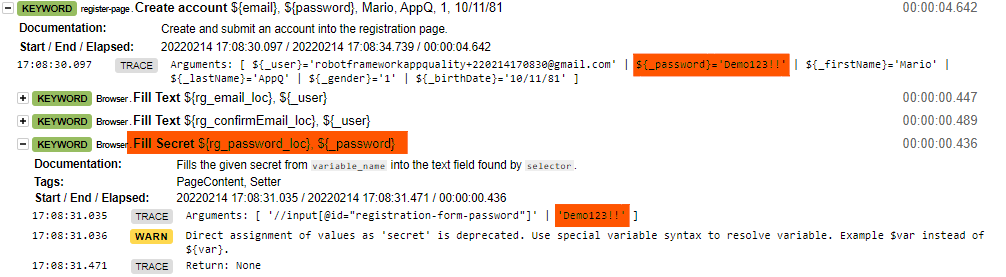 Robot Framework provides a solution that could help us to maintain sensitive data hidden.
Special Variables
When a variable is used in the expression using the normal ${variable} syntax, its value is replaced before the expression is evaluated and log shows its value too.
 If the secret variable is prefixed with
 $variable syntax, without the curly braces, library will resolve corresponding Robot Framework variable, avoiding that its value is reported into log file.
ATTENTION: In the example above, the library used is Browser Library, and the used keyword, Fill Secret, has been developed to accept special variables. Be sure that the keyword you are using accepts special variables.
Environment Variables
Robot Framework provides also the possibility to use environment variables, using the %{variable} syntax.
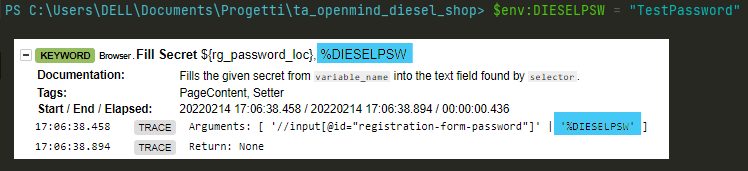 The logs behaviour for environment variables is the same as for normal variables, that is, showing the variable if it is used with curly braces syntax. If you use the environment variable without curly braces (
%variable), its value is not displayed.